
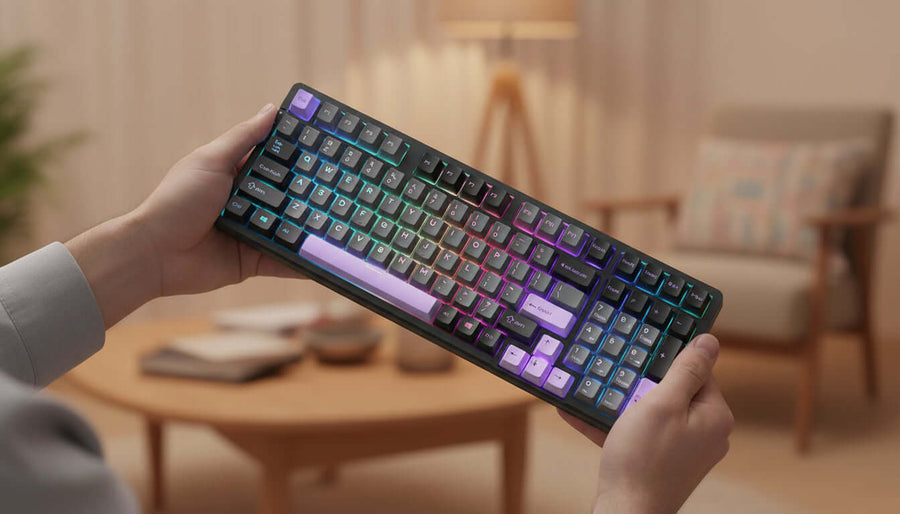
How to Use a Wireless Mechanical Gaming Keyboard Effectively
How do you get the most from a wireless mechanical keyboard?
A wireless mechanical keyboard becomes much more useful when you stop treating it as simply a cable-free keyboard.
With multiple connection modes, switchable devices, RGB controls and hot-swappable switches, there are several ways to configure it depending on what you are doing.
The key is to choose the right connection and setup for each situation instead of using the same configuration for everything.
If you are new to mechanical keyboards, understanding how a wireless mechanical keyboard works can also help you avoid unnecessary connection problems and get a more comfortable typing experience.
Set up the keyboard in the right order
1. Decide which connection you need
Start by choosing between the three available connection modes.
For a computer or laptop, Bluetooth is convenient when you want a clean wireless setup. The keyboard can remember up to three Bluetooth devices, making it possible to move between them without starting the pairing process from the beginning each time.
For gaming, the 2.4GHz wireless connection is a practical choice when you want a direct wireless connection with low latency.
USB Type-C is useful when you prefer a wired connection or simply want to avoid relying on wireless communication.
The important part is not to keep changing modes without a reason. Choose the connection that matches the task.
2. Connect your main devices
If you regularly use several devices, assign the Bluetooth connections deliberately.
For example, you might keep one connection for a desktop computer, another for a laptop and a third for a tablet or smartphone.
Once the devices are paired, switching between them is much easier than repeatedly disconnecting and reconnecting the keyboard.
3. Find a comfortable typing setup
Give yourself some time to get used to the linear switches.
They do not have the pronounced tactile bump found on tactile switches, so the keypress feels relatively smooth from the beginning to the end of the movement.
Avoid pressing every key harder than necessary. A lighter touch can make long typing sessions more comfortable and allows the switches to work as intended.
The gasket-mounted construction and sound-absorbing layers are designed to provide a softer and quieter typing experience, so there is little reason to use excessive force.
Make the keyboard work better for gaming and everyday tasks
A useful setup does not have to be complicated.
For gaming, the 2.4GHz connection can be used when you want wireless freedom without relying on Bluetooth. If you prefer a wired connection, USB Type-C provides another option.
For everyday typing, Bluetooth can be more convenient, especially when working with a laptop or multiple devices.
The 96% layout also requires less adjustment than moving to a much smaller compact keyboard. You still have arrow and function keys available while keeping the overall footprint relatively compact.
If you frequently switch between work and gaming, keeping separate connection and lighting preferences for each situation can make the transition quicker.
Customize the keyboard instead of replacing it
Change the switches when your preferences change
One of the most useful features of a hot-swappable keyboard is that the original switches do not have to remain your permanent choice.
This keyboard supports both 3-pin and 5-pin switches. Compatible switches can be replaced without soldering, allowing the typing feel to be changed later.
If you are experimenting for the first time, change one thing at a time. Otherwise, it becomes difficult to understand which modification actually improved the typing experience.
Do not force a switch into place. If a switch does not seat correctly, remove it and check the pins before trying again.
Use RGB lighting as a practical setting
RGB lighting is primarily a customization feature, but it can also help create different environments.
A restrained static effect may be more comfortable during work, while dynamic lighting can suit a gaming setup.
With multiple lighting modes and adjustable brightness and speed, there is no need to keep the lighting at maximum intensity all the time.
Lower brightness can also make the keyboard less visually distracting when the room is dark.
Avoid the most common setup mistakes
One common mistake is using Bluetooth simply because it is available when a different connection would better suit the task.
Another is pairing devices repeatedly instead of taking advantage of the keyboard's multi-device Bluetooth capability.
It is also easy to overlook the difference between changing a keyboard's appearance and changing its actual typing characteristics. RGB settings affect the visual experience, while switches and keycaps influence how the keyboard feels during use.
When customizing the keyboard, make changes gradually. A simple setup that feels comfortable is usually more useful than a complicated configuration that constantly needs adjustment.
Keep the keyboard in good condition
Mechanical keyboards generally benefit from simple, regular care.
Keep food, liquids and dust away from the switches and openings. When cleaning the keycaps, remove them carefully rather than pulling aggressively at an angle.
Use a soft, dry or appropriately suitable cleaning tool to remove loose dust. Avoid introducing unnecessary moisture into the keyboard.
The PBT keycaps are designed for regular use and resistance to wear, but they can still accumulate dirt over time.
If you replace switches, inspect the pins before installation. Bent pins can prevent a switch from seating correctly and may cause a key not to register.
What to do when something does not work
If the keyboard does not connect wirelessly, first check which connection mode is active.
For Bluetooth, verify that the intended device is selected and that Bluetooth is enabled on the computer or mobile device.
For 2.4GHz operation, check the wireless receiver and make sure the keyboard is using the corresponding mode.
If a key stops registering after changing a switch, check the switch installation first. A misaligned or bent contact is a more useful starting point than immediately assuming the keyboard itself has failed.
When wireless operation becomes unreliable, also consider the battery level and the environment around the receiver or connected device.
Different ways to use the same keyboard
Working at a laptop
Bluetooth is convenient when you want to keep the desk free of cables. The multi-device functionality is particularly useful if the same keyboard is also used with another computer.
Gaming at a desktop
2.4GHz wireless provides a practical gaming setup without requiring the keyboard to remain physically connected.
For sessions where you prefer a wired connection, simply switch to USB Type-C.
Moving between several devices
Use the available Bluetooth connections for the devices you use most frequently.
This approach avoids unnecessary re-pairing and makes the keyboard more useful as a shared input device rather than something permanently attached to one computer.
Personalizing the typing experience
Start with the supplied switches and use the keyboard normally before deciding whether you want to change them.
If your preference changes later, hot-swap support allows compatible 3-pin or 5-pin switches to be installed without soldering.
Final thoughts
The easiest way to get more from a wireless mechanical keyboard is to treat its different functions as tools for different situations.
Use Bluetooth when convenience and multiple devices matter, 2.4GHz when you want a wireless gaming setup, and USB Type-C when you prefer a wired connection. Keep the lighting comfortable, use a light typing technique and make switch changes gradually if you decide to customize the keyboard.
With the right setup, a keyboard like this can serve as a single input device across work, gaming and everyday computing.
If you are looking for a flexible setup with multiple connection options and customization potential, wireless mechanical gaming keyboard is worth considering as the next step.